Publishing a listing in France
The tourist accommodation registration number, primary residence and the declaration on honor, exemptions, what blocks publication and what never does, the nights counter, nights rented outside YStay and the correctable cap, and what a YStay suspension is.
For a tourist accommodation ("meublé de tourisme") located in France, the law known as the "loi Le Meur" (articles L324-1-1 and L324-2-1 of the French Tourism Code) makes publishing a listing conditional on a few pieces of information about the property. YStay checks them at the moment of publication, never after: once your listing is live, it is never automatically unpublished for this reason, whatever happens to that information afterwards.
The registration number
Every tourist accommodation must be declared to the town hall — or, if your municipality has joined it, through the national online service open since 20 May 2026 — which issues a registration number. Enter it on your property's page, in the Furnished tourist accommodation block, in the Registration number field: it is the first field of the block. YStay does not enforce any specific format: formats vary from one municipality to another, and YStay accepts 8 to 20 alphanumeric characters. Once the declaration is saved (Save declaration button), the number is shown on your listing page, in the summaries on your booking site, and in its footer.
The "Furnished tourist accommodation" block on the property page
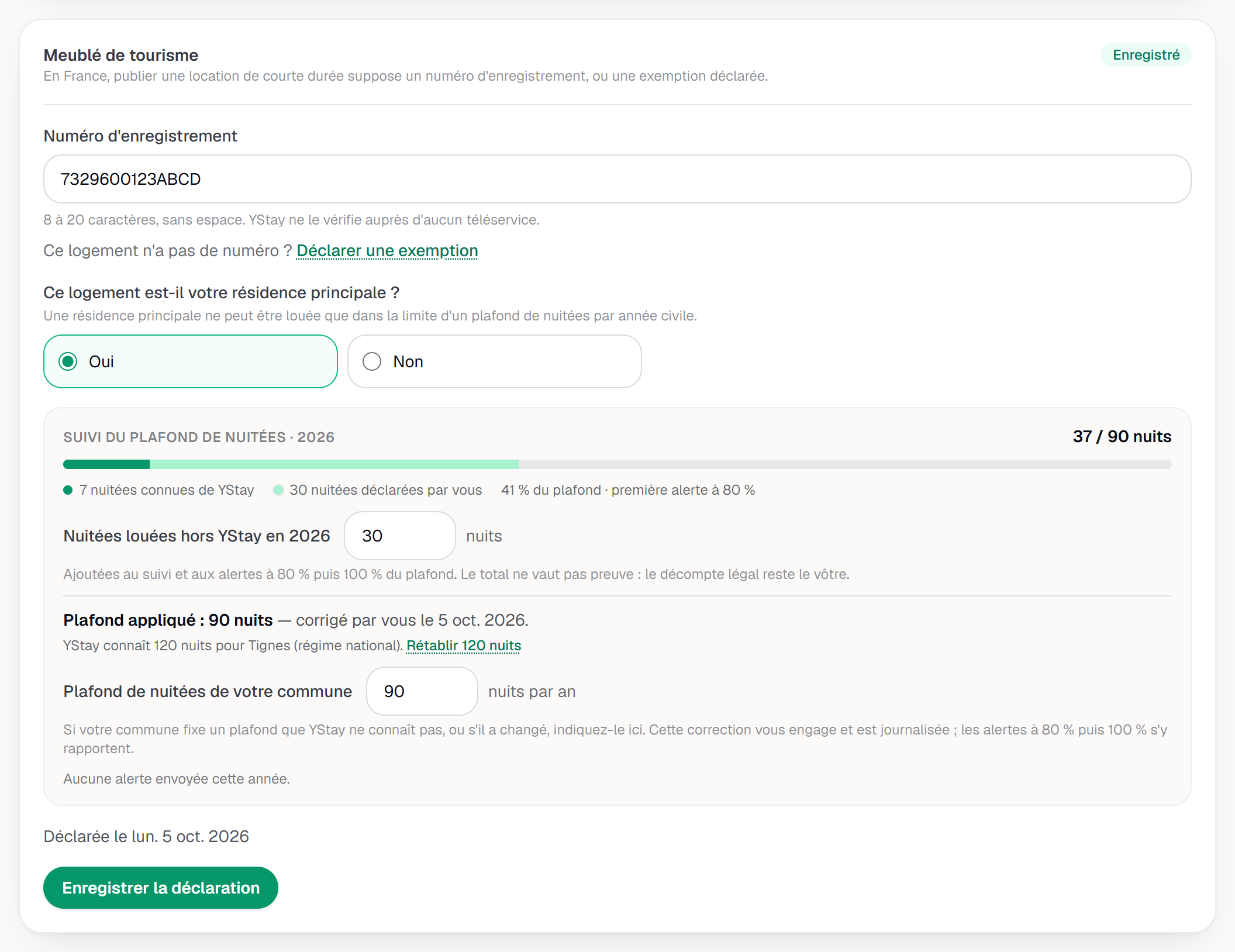
For a property in France, the summary line at the top of the property page shows, among other things, the number of units and published listings, the GPS coordinates, and Tourist accommodation: to complete (or "registered", "exempt"): that badge leads straight to the block. The Furnished tourist accommodation block is a single block that gathers everything asked of you:
- its status, as a badge (Incomplete, Registered or Exempt);
- the To publish, still to do list, which ticks what is already done and names what is still missing — it disappears once everything is filled in;
- the Registration number field, first;
- the primary residence question, the declaration checkbox, and the Save declaration button.
The property's address is filled in on its own card, with its own Save address button: each card is saved separately. When the postal code matches a single commune, YStay deduces it and shows it ticked — Commune: … (INSEE code …), deduced from the postal code. Outside France, the block is not shown.
Primary residence and the declaration on honor
The block asks Is this property your primary residence?, as defined by the regulation applicable to tourist accommodation, with two answers: Yes and No. Neither is pre-selected — until you answer, the To publish, still to do list says so. This answer is what determines whether an annual cap on nights rented applies (see below). A checkbox then has you declare on your honor that you have met the requirements for prior declaration and, where applicable, authorization for change of use: YStay timestamps this declaration the first time you check it. It stays in effect afterwards, even if you change the registration number or the property's country. Everything is saved with Save declaration.
If you are exempt
Some tourist accommodations are not subject to the registration number requirement. If that is your case, click the This property has no number? Declare an exemption link under the number field: a choice of reason (Choose a reason) then replaces the field. The Actually, this property has a number link closes that choice and brings you back to the number field.
- hotel or tourist residence;
- bed and breakfast room;
- mobility lease;
- long-term rental only;
- other reason — a reason spelled out in a sentence or two is then required.
Like the declaration on honor, the exemption is timestamped at the moment you declare it.
What blocks publication — and what never does
For a property located in France, publishing a listing is refused if:
- the property has neither a registration number nor a declared exemption;
- it has a number but no declaration on honor, or no primary-residence answer;
- the chosen exemption is "other reason" with no reason given.
None of this applies to a property located outside France. The To publish, still to do list, in the Furnished tourist accommodation block, goes through these points one by one: it ticks what is done, and shows neither the primary residence nor the declaration on honor when an exemption is declared.
Cap tracking: nights known and nights declared
In the Furnished tourist accommodation block, a Nights cap tracking line, followed by the current year, appears only if you answered Yes to the primary residence question (answer saved) and the property has no exemption. It shows "N nights known to YStay" and the applicable cap: the number of nights already rented in the current calendar year, across every channel, as soon as the reservation is known to YStay — a direct reservation, or one imported from a platform you have connected (Airbnb, Booking.com…). With No, or with an exemption, the line is not shown.
The Nights rented outside YStay in field, followed by the year, lets you enter a figure: the nights you rented directly or on a platform YStay cannot see. The tracking then shows the two numbers, always kept apart — for example "41 nights known to YStay" and "30 nights declared by you" — and then their total against the cap: 71 / 120 nights. This figure is yours: YStay records it with the date and author of each change, without checking it. It counts toward the alerts at 80% then 100% of the cap. There is one figure per property and per calendar year, and you can correct it at any time.
Calendar blocks you set yourself, or imported from an external calendar (iCal) without an associated reservation, are never counted as rented nights.
The annual cap, and the 80% then 100% alerts
The default national cap is 120 nights per year and per property. Some municipalities set a lower cap by local resolution — as of today, 90 nights in Paris, Lyon, Marseille, Bordeaux, and Montpellier. YStay automatically applies your municipality's cap where one is on record, otherwise the national cap.
If the value YStay holds for your municipality is wrong or unknown — a municipality missing from the list, a recent resolution — you can set your property's cap yourself, between 1 and 365 nights, in the Nights cap of your municipality field. The value known to YStay stays displayed next to it, with the Restore button (for example Restore 90 nights) to go back to it in one click; when YStay knows no value, the button reads Remove my correction. The date and author of the correction are kept. A corrected cap clears the "Cap unknown" message and is used for the alerts. YStay does not check your value and never uses it to block anything.
When the total — nights known plus nights declared — crosses 80% of the applicable cap, then 100%, you receive an email and a banner appears in your console. The email names where the cap comes from: set by you, your municipality's rule, or the national regime. No automatic action follows: YStay neither blocks nor unpublishes your listing for this reason — it is a reminder, not a sanction. Each threshold is only signaled to you once per property and per year.
If your listing is suspended by YStay
A suspension is a separate step, decided by the YStay team — most often following a report — and it only affects that specific listing: the rest of your account, your other listings, and your booking site remain unchanged. You are informed by a letter setting out the facts and the ground for the decision; your dashboard itself only indicates that the listing is suspended. You can keep editing it, but you cannot republish it until the suspension is lifted.
The exact content of that letter, how to appeal it, and the six-month window to act are described in If one of your listings is reported or removed.
What's next
- Set your prices — the other publication prerequisite, along with the cover photo.
- Your site: legal notice — the registration number shown on your site, and the legal identity that gates its publication.
- If one of your listings is reported or removed — listing suspension in detail, and how to appeal it.
- Listings — the other guides in this section.
Updated on